A story of collaboration, authentic audience, cross-grade mentorship, creative coding, and physical computing written to encourage educators!
Using MicroBlocks + OctoStudio for a Grade 2 Winter Performance
At our elementary school winter festival, something unexpected happened.
Paper snow fell from the ceiling.
And the Grade 2 students were controlling it.
This post shares how we used MicroBlocks, micro:bit, and OctoStudio together to create a live robotics effect for a school performance — and why this combination is such a powerful pathway for young coders.
The Big Idea
Grade 2 students:
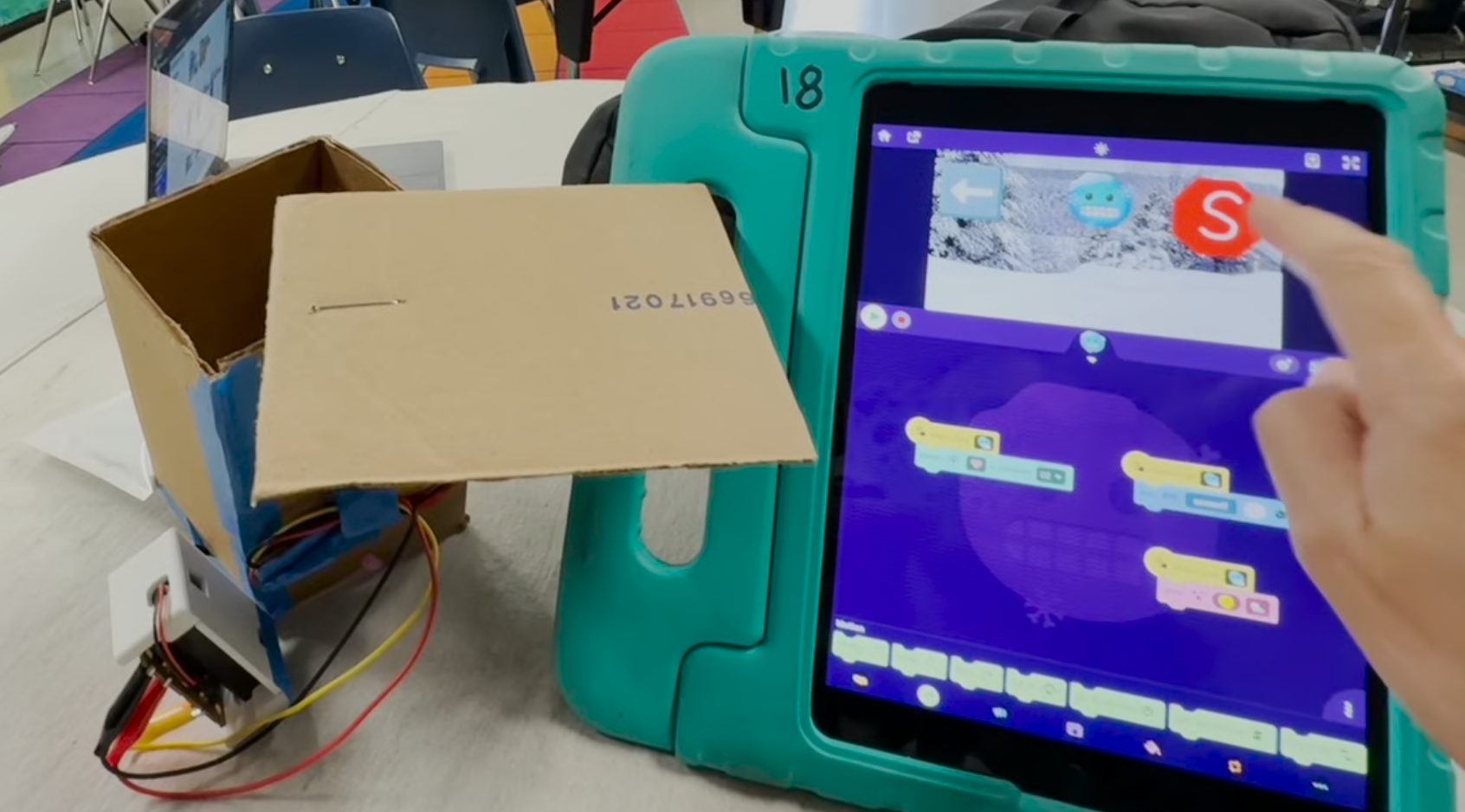
- Built cardboard “snow release” boxes
- Created paper snow
- Programmed an iPad app in OctoStudio
- Triggered a live robotics effect during a school performance
Behind the scenes:
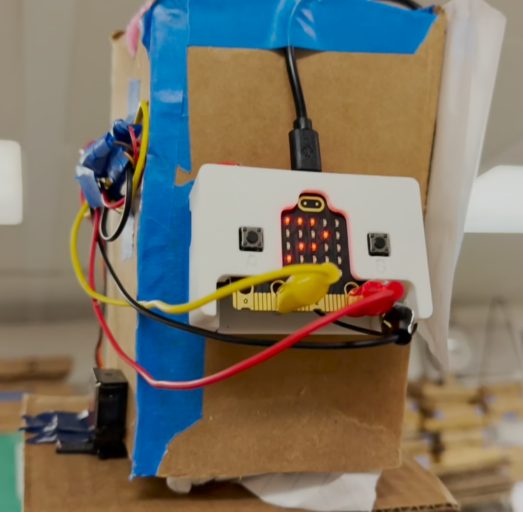
- Fifth graders wired servo motors to micro:bits
- I wrote the MicroBlocks program that ran on the micro:bits
- The Grade 2 classroom teacher orchestrated rehearsal, context, and performance flow
The result? A gymnasium full of students cheering as snow dropped on cue — triggered by second graders.
Hardware + Software Overview
Student-facing tool:
- OctoStudio (iPad app)
Microcontroller:
- micro:bit
Firmware / runtime:
- MicroBlocks
Actuation:
- Servo motors connected to trap doors on cardboard boxes
Trigger method:
- OctoStudio “beam” signal
- MicroBlocks code listens for the beam and activates the servo
The servo motors were mounted to bottom-facing doors on cardboard boxes suspended in the auditorium. When activated, the doors opened and released paper snow.
Why This Pathway Is Interesting
Many educators use OctoStudio. Many educators use micro:bit. Fewer combine them in this way.
The key bridge is MicroBlocks.
Using MicroBlocks, the micro:bit can listen for OctoStudio beam signals and respond physically — turning tablet-based block coding into real-world robotics control.
This implementation builds on work shared by Wenjie, who extended OctoStudio beam support for micro:bit projects. The references that helped guide this project:
I was first introduced to MicroBlocks by Kathy Giori at the Bay Area Maker Faire (Mare Island, 2024), and this project felt like the perfect opportunity to explore its flexibility in a live setting.
What the Students Actually Did
Grade 2 Students
- Designed and built cardboard “snow release” boxes
- Engineered simple bottom doors
- Produced paper snow
- Programmed OctoStudio to send beam signals
- Rehearsed timing during performance practice
- Triggered the snow live
The coding was simple and clear: send a beam when a button is tapped.
Images:
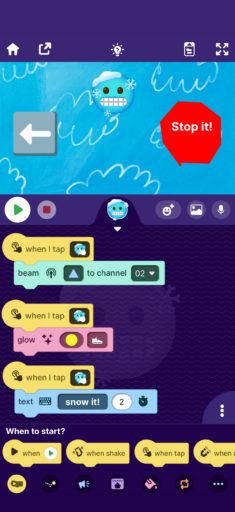
MicroBlocks Code (Teacher-Created but possible for most of my 3rd graders I think)
The micro:bit ran a MicroBlocks program that:
- Listened for a specific beam ID
- Rotated the servo to open the trap door
- Returned the servo to closed position
Image: 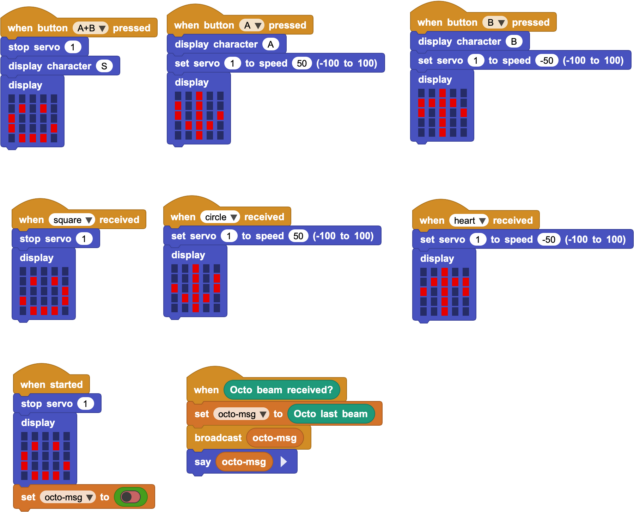
Uploading directly via MicroBlocks made iteration fast — especially useful during rehearsal testing.
Fifth Grade Contribution
Fifth graders handled:
- Servo wiring
- Power connections
- Mechanical mounting adjustments
This cross-grade collaboration gave older students meaningful technical responsibility and gave younger students a visible “tech mentor” layer.
The Physical Build
The snow boxes were simple but effective (see the images above):
- Cardboard structure
- Bottom flap door
- Servo arm connected to door
- Suspended in the auditorium
The engineering constraint was real: if the servo didn’t move correctly, nothing happened.
Authentic Assessment: Did It Work?
This project shifted assessment away from a rubric.
Success was measured IRL:
Was the audience entertained?
Upon drop, the audience response was immediate and loud. The cheering created a powerful feedback loop — students saw that code + cardboard + motors = real-world impact.
It wasn’t a simulation.
It wasn’t just a classroom demo.
It was part of a public performance.
Why This Matters Pedagogically
1. Robotics Through Familiar Tools
OctoStudio is accessible and playful. MicroBlocks allows that environment to extend into physical computing without abandoning block-based thinking.
This creates a pathway:
OctoStudio → Beam → MicroBlocks → micro:bit → Servo → Physical Action
That bridge lowers the barrier to robotics.
2. Real Audience > Teacher Assessment
When projects leave the classroom:
- Students care more about reliability
- Iteration becomes meaningful
- Debugging becomes urgent and authentic
The measure of success is not “Does the teacher like it?” It’s “Did it function in front of everyone?”
3. Cross-Grade Systems Thinking
Grade 2: design + coding Grade 5: wiring + electronics Teacher: system integration
Students saw that complex systems require multiple roles — coding, hardware, mechanical design, rehearsal timing.
Video Walkthrough
I record a short explanation video for students whenever possible. It serves two purposes:
-
Reinforces in-class instruction
-
Allows students to rewatch independently
This supports differentiation without slowing down the entire group.
Reflections on MicroBlocks
MicroBlocks made this feasible because:
- It allows live programming to micro:bit
- It supports extensions and flexible communication
- It bridges block coding and embedded systems
For educators already using micro:bit, MicroBlocks offers a fast, responsive workflow. For educators using OctoStudio, it opens a door into robotics.
If You Want to Try Something Similar
Start small:
- One micro:bit
- One servo
- One beam trigger
- One cardboard mechanism
Then scale.
The magic isn’t the snow.
It’s the moment students realize they can control the physical world outside of the classroom with code.